WordPress Staging Explained: Which Affordable Hosts Include It, on Which Plan (2026)
WordPress staging gives you a hidden duplicate of your site for trying out updates, plugins and design changes before any visitor sees them. If something breaks on the copy, the real site is untouched; when it works, you push it live.
You don't need an expensive managed host to get it. Among affordable hosts, Bluehost includes one-click staging on its entry Starter plan, SiteGround from GrowBig upward and Hostinger on plans above Premium. The plan that unlocks staging is often not the one in the headline price, though, so this guide lists the cheapest plan with staging at each host and what it renews at. Prices were read on each host's US pricing page on 9 and 10 Oct 2026.
What staging actually is
A staging site is a duplicate of your WordPress install: the same files, theme, plugins and database, frozen at the moment you create it and kept at a private address. You change things there, check the result, and only then copy the changes back to the live site.
The value is that you find problems before your visitors do. A plugin update that clashes with your theme, a redesign that falls apart on phones or a PHP version change that breaks a form all show up on staging first, where fixing them costs nothing but time.
Why it matters
Every WordPress site changes constantly: core updates, plugin updates, theme updates and your own edits. Most go fine. The one that doesn't takes down a page, a checkout or the whole site, and on a live site you are debugging with visitors watching. For a blog that means lost readers; for a shop it means lost orders. Staging turns that public incident into a private test.
How to use a staging site
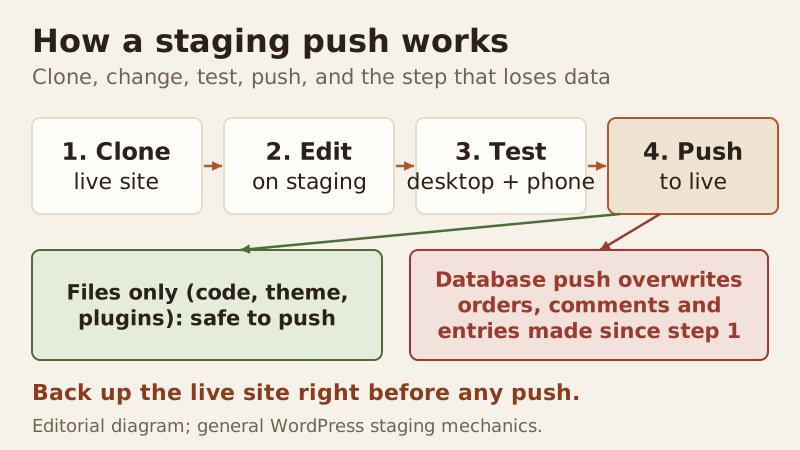
The routine is the same everywhere: clone, change, test, push. Create the copy from your host's dashboard or a plugin, make your changes on the staging address, test the pages that matter on desktop and phone, then push. The diagram shows the one step where people get caught out.
- Create the staging copy shortly before you start, so it matches the live site closely.
- Make your changes on the staging address only.
- Test the key pages, forms and checkout on desktop and phone.
- Push to live during a quiet period, then check the live site straight away.
Use staging for anything that could break the site: major updates, new plugins or themes, theme edits and PHP version changes. Fixing a typo on a live post doesn't need it.
Which affordable hosts include staging, from which plan
This is the comparison other staging guides skip: the lowest plan with staging at each mainstream host, and the price you pay once the introductory term ends.
| Host | Lowest plan with staging | Intro price | Renews at | Intro term |
|---|---|---|---|---|
| Bluehost | Starter (all standard plans) | $3.99/mo | $9.99/mo | 36 months |
| SiteGround | GrowBig (not StartUp) | $4.99/mo | $29.99/mo | 12 months prepaid |
| Hostinger | Not on Premium; help page says "Business or higher" (next card up: Unlimited) | $3.99/mo (Unlimited) | $16.99/mo | 48 months |
| DreamHost | DreamPress only (not shared plans) | $14.99/mo (DreamPress 1) | $19.99/mo | 12 months |
| GreenGeeks | Staging offered; plan not stated | From $2.95/mo (Lite) | $13.95/mo | 12 months prepaid |
| Hosting.com (formerly A2 Hosting) | Pro (not Starter) | Not readable on the pages we checked | Not readable | n/a |
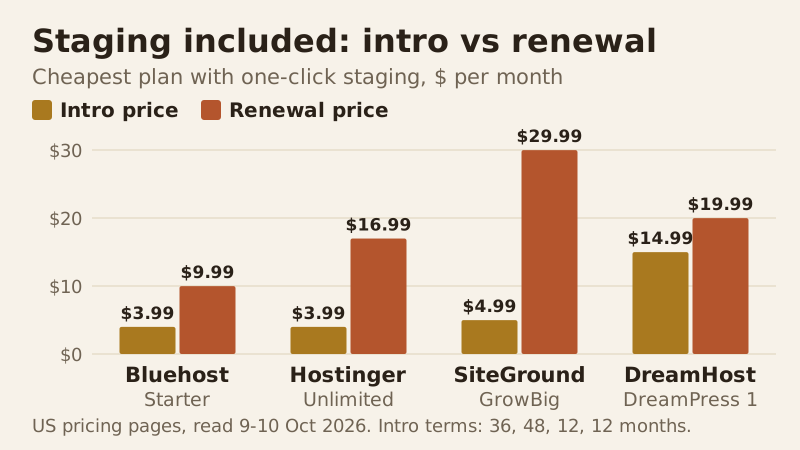
The cheapest plan with staging at each host: intro vs renewal
Bluehost, Hostinger and SiteGround start within a dollar of each other, with DreamPress well above them; the renewals spread much further. Once the first term ends, SiteGround's GrowBig costs three times Bluehost's Starter each month. Term length matters too: Bluehost's rate is locked for 36 months, Hostinger's for 48, and SiteGround's and DreamHost's for 12, so those two reach their renewal prices first.
Bluehost: staging from the entry plan
All three of Bluehost's standard plans, from Starter through eCommerce Essentials, carry a "WordPress Staging Site" line, so the cheapest plan has it. Starter costs $3.99 a month for a 36-month first term, then $9.99, and covers 10 websites with 10 GB of NVMe storage. Backups are listed as weekly on the plan card but daily in the page's FAQ, so confirm the schedule with Bluehost if it matters to you. If the lowest renewal with staging is your priority, Bluehost Starter is the cheapest route we found.
Affiliate link. We may earn a commission — it never moves a ranking.
SiteGround: staging from GrowBig
SiteGround's StartUp plan has no staging. GrowBig adds it, along with on-demand backups and unlimited websites, at $4.99 a month prepaid for 12 months, renewing at $29.99. GoGeek adds Git alongside staging for $7.99, renewing at $44.99. Daily backups with 30 days of history come on every SiteGround plan, which pairs well with staging. Choose SiteGround GrowBig if you value those backups and accept the steepest renewal here.
Affiliate link. We may earn a commission — it never moves a ranking.
Hostinger: staging above Premium
Hostinger's staging tool is not on Premium, its cheapest WordPress-ready card. Its help page gates staging to the Business plan or higher; on the current US price grid the next card up is Unlimited, at $3.99 a month on a 48-month term, renewing at $16.99, with daily backups and 50 GB of NVMe storage. That makes Hostinger's real staging price a dollar above its headline one. Hostinger Unlimited suits you if you want unlimited sites and the longest locked rate.
Affiliate link. We may earn a commission — it never moves a ranking.
DreamHost, GreenGeeks and Hosting.com
DreamHost's shared plans don't list staging; it comes with DreamPress, its managed WordPress tier. GreenGeeks lists staging among its developer tools without saying which plan gets it, so ask before you buy. Hosting.com, which A2 Hosting became in 2025, puts staging sites and preview URLs on its Pro plan and above; its Starter plan has neither. DreamPress 1, the cheapest DreamPress plan, is $14.99 a month for the first year and renews at $19.99, for one site with 15 GB of NVMe storage and 14 days of backups (read 10 Oct 2026). We could not read current prices for Hosting.com's plans, so they are left out rather than guessed.
Staging and affordable hosting: does the plan matter?
It matters more than the brand. Two plans from the same host can differ by exactly this feature, and a host's cheapest plan may not include it. If you expect to update plugins and themes regularly, price the cheapest plan with staging at each host, not the advertised entry plan, and compare those on their renewal. Our best WordPress hosting comparison puts the full renewal picture side by side.
Five questions to ask a host about staging
Plan pages usually say "staging" and nothing more, yet the details decide whether the feature is useful. Ask support, or check the host's documentation, before you pay:
- Is staging on the exact plan and term I am buying, or only on a higher tier?
- Can I push files and the database separately, or is it all or nothing?
- Can I choose which database tables to push, so new orders and comments survive?
- How many staging copies can I keep at once, and do they count against my storage or site limits?
- Does creating or pushing a staging copy take an automatic backup first?
A host that answers all five clearly is giving you a real staging tool. If the answers are vague, budget for the plugin route below as a fallback.
No staging on your plan? The plugin route
You can stage without host support. WP Staging's free plugin clones your site into a subfolder of the same install and lets you create as many staging copies as you like, and it can back up and restore the site. The catch: pushing changes from staging back to live is a paid feature, available from its Business plan upward, so with the free version you repeat your tested changes on the live site by hand.
The other option is a local copy on your own computer, using a local WordPress development tool. It costs nothing and keeps experiments completely off the server; moving the finished site back is a migration, and the steps are the same as in our WordPress migration walkthrough.
Pushing changes live without breaking WooCommerce orders
The danger in staging is the database. Your staging copy freezes the database at the moment you clone it. If the live site takes orders, comments or form entries after that, a full push copies the old database over the new one and those entries disappear.
There are three safe patterns. Push files only when your change is code, a theme or a plugin, and leave the live database alone. Keep the time between cloning and pushing short, and pause new orders during the push on a busy shop. Or make database-level changes, such as settings, directly on the live site after testing them on staging. Whatever you choose, take a fresh backup immediately before any push.
What staging cannot protect you from
Staging is a test environment, not a backup. If you push a bad change and have no recent backup, staging won't roll you back. Keep backups as a separate safety net.
Staging also can't fully copy live conditions. Real traffic, live payment gateways, caching and outgoing email can all behave differently on the real site. Test what you can, then watch the live site closely for the first hour after a big push.
Edge cases
A few situations need extra care. Sites behind a CDN can serve the old cached version after a push, so purge the cache. Search-engine visibility should stay off on staging, so the copy isn't indexed alongside your real site. And if you use a page builder or a caching plugin that writes absolute URLs, check that staging links don't leak into the live site after the push.
WordPress staging: questions answered
What is a WordPress staging site?
Which WordPress hosting plans include staging?
What is the cheapest WordPress hosting with staging?
Can I create a staging site for free?
Does pushing staging to live delete new orders or comments?
Next: compare the best WordPress hosting, ranked by renewal price, or read how to host a WordPress site step by step.