Do You Need Hosting for WordPress? WordPress.com vs Self-Hosted, Priced Over 3 Years
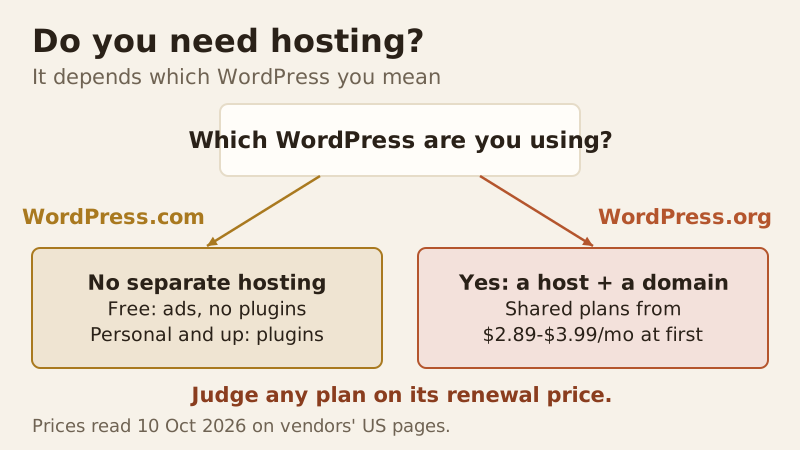
Yes, if you mean WordPress.org, the free software you install yourself: it needs web hosting and, in practice, a domain name. No, if you mean WordPress.com, which is a hosting service in its own right: you sign up and it runs WordPress for you, from a free plan upward. Either way the site lives on somebody's server. The real question is whether you rent that server from a web host or let WordPress.com handle it.
For most small sites both routes cost about the same in the first three years. WordPress.com's Personal plan is $99 for three years and now allows plugins; a budget shared host costs roughly $108 to $144 over the same period on its intro deal. Self-hosting wins on control and choice of host; WordPress.com wins on having nothing to maintain. Prices below were read on the vendors' US pages on 10 Oct 2026.
Short answer: yes for WordPress.org, no for WordPress.com
WordPress.org gives you the software for free, but software needs somewhere to run. A WordPress site is PHP code and a MySQL database that have to sit on a server connected to the internet around the clock, and that is what a web host rents you. Without hosting, a WordPress.org site can only run on your own computer, visible to nobody else.
WordPress.com bundles the software and the server into one account. You never pick a host, install anything or update WordPress yourself, because the hosting is the product. That is why people searching "do I need web hosting for WordPress" get two opposite answers: they are asking about two different things with the same name.
WordPress.org vs WordPress.com in one table
| WordPress.org on your own host | WordPress.com Free | WordPress.com Personal and up | |
|---|---|---|---|
| Needs separate hosting | Yes | No | No |
| Software cost | $0 | $0 | Included |
| Typical price | Shared host from $2.89 to $3.99/mo intro | $0 | From $48 first year (Personal), renews at $60/year |
| Install plugins | Yes | No | Yes (all paid plans) |
| Ads shown on your site | None from the host | WordPress.com ads | No ads from Personal up |
| Your own domain | Yes; free first year with many hosts | No | Yes; free first year on annual plans |
| Who maintains WordPress | You (hosts help with updates) | WordPress.com | WordPress.com |
| Can you switch provider? | Yes, to any host | Export to move | Export to move |
The line that used to separate the two has moved. WordPress.com's own support page now says plugin installs are available on every paid plan, Personal included. For a long time, plugins were the main reason to self-host; today the reasons are more about control, choice of provider and what you can do on the server itself.
3-year cost: WordPress.com plans vs shared hosting
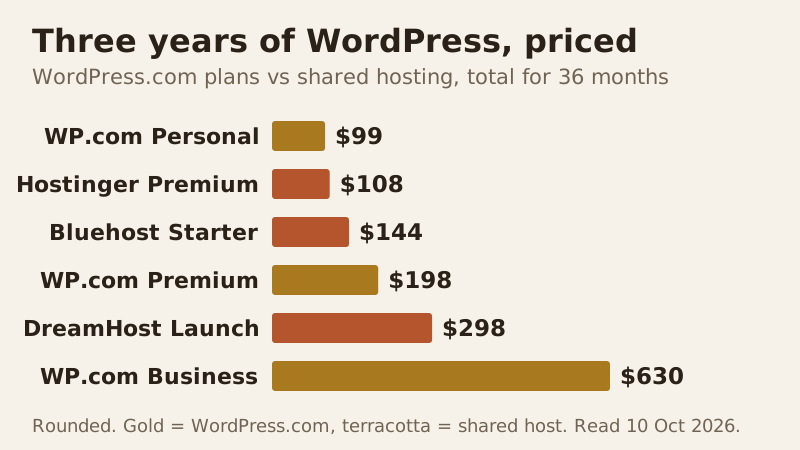
Here is how the bars are built. WordPress.com sells three-year terms directly: Personal $99, Premium $198 and Business $630, against $48, $96 and $300 for one year. For the shared hosts we count the intro price for its term and the published renewal after it. Hostinger bills Premium as one $143.52 payment covering 48 months at $2.99 each, so three years of that service is worth $107.64. Bluehost's Starter comes to $143.64 for its 36 months at $3.99. DreamHost's Web Hosting Launch is $2.89 a month for the first year, then $10.99, so $34.68 plus $263.76: $298.44.
The two routes overlap more than most guides admit. If all you need is a small site with a few plugins, WordPress.com Personal is the cheapest way in. Shared hosting pulls ahead on what each dollar buys: more storage, several sites per plan, email accounts with some hosts and full server access. WordPress.com renewals cost more than the first term, though: Personal bought for three years auto-renews at $3.50 a month, or $126 for the next three years, against the $2.75 a month you pay at first.
Term length moves these numbers a lot. DreamHost's WordPress page also offers its Launch plan at $1.99 a month for the first four years, renewing at $7.99, which is far cheaper than the one-year deal above if you're willing to commit. Whatever you compare, line up the same number of years.
What you can't do without your own host
Plugins are no longer the dividing line, but a few things still are. On your own host you choose the provider and can leave for another at any time by copying your files and database. You pick the PHP version, get a database you control and, on most plans, file access over FTP or SFTP, and you can run anything the host allows alongside WordPress. WordPress.com lists SFTP among its Business plan features, so check what file access your plan includes before you count on it.
Money matters too. Ads from WordPress.com appear on free sites only, and the paid plans remove them. If you want to run your own ads or sell products, check the plan you're on allows it before you build. On your own hosting there's no platform rule about monetising beyond the host's terms of service.
Which route suits which site
The right answer depends less on price than on what the site has to do. A rough guide:
- A personal blog or hobby site you don't want to maintain: WordPress.com, free or Personal.
- A portfolio or a small business brochure site: either route works; WordPress.com Personal is simplest, a shared host gives more storage and room for a second site.
- Several sites, or sites you build for clients: self-hosted, because one shared plan covers multiple sites and you control where they live.
- An online shop: compare WordPress.com Commerce ($540 a year) with a shared host's e-commerce plan on the full renewal price before you choose.
None of this is permanent. Content moves between the two routes with WordPress's own export and import tools, so the first choice is not a trap.
The costs that come after the first bill
The first invoice is rarely the full story on either route. Free domains last one year, at WordPress.com and at most shared hosts, and then renew at the normal rate. Hosting renewals rise once the intro term ends, which is why the chart counts them. Email is a separate line at many providers: Bluehost sells Pro Email after a one-month trial, Hostinger's included mailboxes are free for the first year, and DreamHost's mailboxes on Launch come with a three-month trial. Budget for these from the start and neither route will surprise you.
Free ways to run WordPress, and their limits
You can use WordPress without paying anyone, within limits. The first is a local install: run WordPress on your own computer with a local development tool. It is perfect for learning and building a site before launch, but nobody else can see it until you move it to a host.
The second is WordPress.com's free plan, which puts your site at a wordpress.com address, shows WordPress.com ads and doesn't allow plugins. It's fine for a personal blog or a test. The third is a free PHP host, which can run WordPress.org with tight caps on traffic and features; for anything with readers, those caps arrive quickly.
There's also a no-risk way to try paid hosting. Hostinger, Bluehost and DreamHost all offer a 30-day money-back window on their hosting plans, with exclusions such as domain fees, so you can build on a real host and cancel within the month if it isn't for you.
If you choose self-hosted: where to start
If the answer for you is WordPress.org, start with an affordable shared plan and weigh it by what it renews at rather than its opening rate. Three reasonable starting points, as of 10 Oct 2026: Hostinger Premium at $2.99 a month for 48 months, renewing at $10.99; Bluehost Starter, $3.99 monthly over a 36-month first term and $9.99 after, staging included; and DreamHost's Launch plan at $2.89 for the first year, renewing at $10.99, if you'd rather not prepay several years.
New to all of this? Our WordPress hosting for beginners guide walks through the first setup, and WordPress hosting vs regular hosting explains what the "WordPress" label on a hosting plan actually adds. When you are ready to pick a self-hosted plan, our best WordPress hosting picks compare them on renewal price.
Edge cases
Billing monthly changes WordPress.com's maths: Personal is $9 a month on monthly billing, or $108 a year, against $48 paid annually for the first year and $60 a year after that. The free domain on WordPress.com comes only with annual plans, not monthly ones. If you start on WordPress.com and later want your own host, you can export your content and import it into a self-hosted install; plan the move around your renewal date so you don't pay twice.
Finally, own your domain whichever route you pick. A domain registered in your name can point at WordPress.com today and a shared host tomorrow, which keeps the choice reversible.
Do you need hosting for WordPress? Questions answered
Do I need hosting for WordPress?
Do I need web hosting for WordPress if I use WordPress.com?
Is WordPress hosting different from regular web hosting?
Can I use WordPress without hosting?
Is WordPress.com cheaper than self-hosting?
Next: compare the best WordPress hosting, ranked by renewal price, or read how to host a WordPress site step by step.